Gaming PC upgrades ranked by the problem they solve
A conditional upgrade order for gaming PCs: diagnose the issue, check fit and compare a smaller change with replacing the whole machine.
Research-based buying advice. We have not hands-on tested or benchmarked these complete PCs. Exact components, model variants and seller terms matter.
The buying answer
There is no universal component to buy first. Start by identifying the problem, then rank only changes that address it and fit your exact machine. A capacity upgrade, CPU change and GPU change solve different needs; replacement is the comparison to make when several parts must change together.
See matching catalogue optionsYour PC is frustrating you, and every parts guide seems to suggest a different purchase. The next step is to connect one observable problem with a change that has a documented chance of solving it.
Choose this route if…
- The proposed upgrade addresses an identified limitation rather than a vague wish for a faster PC.
- Exact motherboard, case, PSU and memory requirements have been checked.
- Its total installed cost compares well with keeping the machine or replacing it.
Think again if…
- You are treating a generic bottleneck percentage as a diagnosis of your games.
- The recommendation ignores model-specific BIOS, connector or clearance checks.
- Several necessary replacements erase the advantage over a complete alternative.
The GPU names behind the buying decision
Manufacturer specifications for desktop GPUs, checked 5 November 2026. Graphics memory is separate from system RAM; these figures do not rank whole-PC performance.
Swipe or scroll sideways to see all columns.
| GPU | Graphics memory | The variant check |
|---|---|---|
| Desktop RTX 5060 specifications | 8GB GDDR7 | RTX 5060 Ti is a different GPU. |
| Desktop RTX 5070 specifications | 12GB GDDR7 | RTX 5070 Ti is a different GPU. |
First priority: define and reproduce the problem
Record the game or task, settings and the behaviour you want to improve. Does the complaint concern available storage, a particular game’s responsiveness, crashes, fan noise or something else? These are different problems. Changing hardware without identifying the symptom makes it harder to judge whether a purchase worked.
Check the game or application requirements and investigate obvious software or configuration issues before selecting parts. This guide does not diagnose your computer remotely or promise a performance increase. A measured comparison before and after a change is stronger evidence than buying a component because a generic list puts it first.
Sources: microsoft.com: supporting documentation for First priority: define and reproduce the problem
Capacity route: buy room only when room is the issue
If the identified problem is insufficient storage space, compare suitable storage rather than automatically replacing the graphics card. Establish the supported drive type, available connectors or slots, physical format and how you will transfer or retain data. A larger drive is a capacity choice; it is not a promise to fix every hitch or loading problem.
For memory, establish the currently installed kit, free slots and motherboard support. Do not mix DDR4 and DDR5 recommendations or assume capacity is the only property that matters. Ask whether the workload actually needs additional memory before comparing kits. Record the full kit specification and the board’s own guidance.
Sources: amd.com: supporting documentation for Capacity route: buy room only when room is the issue
Performance route: prove the part fits the target
A graphics upgrade needs the exact card, case clearance, power connectors and PSU requirements. Use the board-partner card specification rather than applying a reference card’s dimensions to every version. Also compare relevant game evidence at your settings; the GPU name does not establish the result of a complete PC.
A CPU upgrade needs a board-specific support check. One documented example is ASUS PRIME B450M-A support for Ryzen 7 5700X3D from BIOS 3802. That does not certify another B450 model. Include firmware instructions, cooling requirements and the cost of any additional work before deciding that a drop-in change is straightforward.
Sources: nvidia.com: supporting documentation for Performance route: prove the part fits the target · nvidia.com: supporting documentation for Performance route: prove the part fits the target · asus.com: supporting documentation for Performance route: prove the part fits the target
Replacement route: compare the complete bill
When the desired change also requires a motherboard, memory, cooler, PSU or case, total them together and compare a suitable complete system. Keep useful existing parts where documented fit allows. The right order is the order that solves your identified problem economically, with clear uncertainties—not a universal ladder that asks every reader to buy the same components.
Sources: amd.com: supporting documentation for Replacement route: compare the complete bill · msi.com: supporting documentation for Replacement route: compare the complete bill
Your last checks before buying
- Write a reproducible symptom and target before shopping.
- Identify every existing component by exact model.
- Use manufacturer support lists and installation requirements.
- Include extra parts, labour and data-transfer needs in the cost.
- Compare the full upgrade with a suitable replacement PC.
When those checks agree with your brief, the purchase has a purpose: the games you want to play, at the settings you accept, without paying for a label that solves the wrong problem.
Check the specification. Then check the offer.
These catalogue matches have an Amazon availability check from the last 24 hours. They are ordered by today's Amazon price, then name—not by commission. A specification match is a starting point, not a complete-PC test or a confirmed fit.
fanxiang 1TB NVMe
Consider storage when capacity or loading is the problem. Confirm the motherboard slot, drive dimensions and supported interface first.
Upgrade component · Confirm the full listing and exact variant.
£145.99Checked yesterday, 22:35 DetailsAvailability checked yesterday, 22:35. The retailer confirms current stock.
Check this model on Amazon See product details and retailer optionsASUS Prime RTX 5060 OC 8GB
Compare this RTX 5060 configuration for a 1080p shortlist. Confirm the CPU, memory, power supply and game-specific performance before choosing.
Graphics card only · Confirm the full listing and exact variant.
£429.98Checked yesterday, 22:35 DetailsAvailability checked yesterday, 22:35. The retailer confirms current stock.
Check this model on Amazon See product details and retailer optionsMSI RTX 5060 Gaming OC 8GB
Compare this RTX 5060 configuration for a 1080p shortlist. Confirm the CPU, memory, power supply and game-specific performance before choosing.
Graphics card only · Confirm the full listing and exact variant.
£469.99Checked yesterday, 22:35 DetailsAvailability checked yesterday, 22:35. The retailer confirms current stock.
Check this model on Amazon See product details and retailer optionsASUS Prime RTX 5070 OC 12GB
Compare this RTX 5070 configuration for a higher-budget shortlist. Check performance in your games at your screen resolution before paying more.
Graphics card only · Confirm the full listing and exact variant.
£759Checked yesterday, 22:35 DetailsAvailability checked yesterday, 22:35. The retailer confirms current stock.
Check this model on Amazon See product details and retailer optionsMSI RTX 5070 Gaming Trio OC 12GB
Compare this RTX 5070 configuration for a higher-budget shortlist. Check performance in your games at your screen resolution before paying more.
Graphics card only · Confirm the full listing and exact variant.
£908.99Checked yesterday, 22:35 DetailsAvailability checked yesterday, 22:35. The retailer confirms current stock.
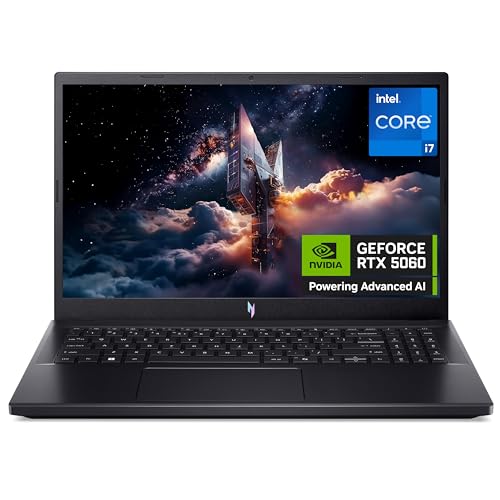
Check this model on Amazon See product details and retailer optionsAcer Nitro V15 RTX 5060 (i7-13620H, 1TB)
Compare this RTX 5060 configuration for a 1080p shortlist. Confirm the CPU, memory, power supply and game-specific performance before choosing.
Graphics card only · Confirm the full listing and exact variant.
£1,049.99Checked yesterday, 22:35 DetailsAvailability checked yesterday, 22:35. The retailer confirms current stock.
Check this model on Amazon See product details and retailer options


Retailer links can earn GVT commission at no extra cost to you. The purchase is with the retailer. Price, delivery, returns, seller and warranty must be checked there.
Questions worth answering before checkout
Should everybody upgrade the GPU first?
No. First identify the limitation. A GPU is a relevant purchase only when evidence connects it with the improvement you want and it fits the system.
Does this guide guarantee that an upgrade is compatible?
No. Compatibility needs exact model, firmware, power, clearance and memory checks. This page organises those questions rather than certifying an individual build.
How this assessment was made
GVT compares the published specifications and requirements linked beside each section, then explains the buying implications. Those implications are editorial judgement; specifications are not a substitute for game benchmarks. Catalogue stock and price checks update separately from the dated article research. No test score or automatic winner is invented.
Retailer options can change without changing the research date. How GVT researches · How affiliate links support the site.
Make the next comparison useful.
Find a route for my games and budgetBuy for the games you want to play.
We’re preparing GVT buying notes: useful comparisons, setup guides and gift ideas, with reasons to choose and reasons to skip. Join the free list to hear when they’re ready.
Free to join. We use your email for these buying notes. How we use your data.