RTX 3060 vs 4060 vs 5060 PCs: older value or a newer build?
Compare three desktop GPU families without confusing VRAM, complete-PC value or the condition of an older system.
Research-based buying advice. We have not hands-on tested or benchmarked these complete PCs. Exact components, model variants and seller terms matter.
The buying answer
Compare the exact GPU variant and complete PC at the price available now. An older machine needs a clear condition-and-cost advantage; a newer machine needs a useful benefit for your games and ownership needs. Neither generation number nor VRAM capacity alone determines the best purchase.
See matching catalogue optionsYou have three plausible PCs from different generations in your tabs. You want one understandable comparison that accounts for what you receive, what you might replace and what you actually need to play.
Choose this route if…
- The chosen complete system has credible evidence for your target games and settings.
- You understand why its price, condition and warranty make sense against the other two.
- You have verified the exact GPU memory variant rather than comparing family names.
Think again if…
- You are treating every RTX 3060 as the same 12GB card.
- You are paying extra purely because one generation number is larger.
- The cheaper system needs enough immediate work to remove its apparent saving.
The GPU names behind the buying decision
Manufacturer specifications for desktop GPUs, checked 5 November 2026. Graphics memory is separate from system RAM; these figures do not rank whole-PC performance.
Swipe or scroll sideways to see all columns.
| GPU | Graphics memory | The variant check |
|---|---|---|
| Desktop RTX 5060 specifications | 8GB GDDR7 | RTX 5060 Ti is a different GPU. |
| Desktop RTX 4060 specifications | 8GB GDDR6 | RTX 4060 Ti is a different GPU. |
| Desktop RTX 3060 specifications | 8GB or 12GB GDDR6 | Do not assume that every RTX 3060 is the 12GB model. |
Make three listings genuinely comparable
Start a short list containing each machine’s exact CPU, GPU, memory, storage, power supply, condition and delivered price. Add the seller terms and any missing accessories you need. The resulting comparison is more useful than arranging three GPU names from old to new.
A used PC and a new prebuilt carry different uncertainties. For the older machine, ask what has been replaced and how the actual unit was tested. For any configuration, a vague component description is still vague even if the GPU is newer. Keep unanswered questions beside the price rather than mentally filling them with favourable assumptions.
Sources: nvidia.com: supporting documentation for Make three listings genuinely comparable · nvidia.com: supporting documentation for Make three listings genuinely comparable · nvidia.com: supporting documentation for Make three listings genuinely comparable
Read the variant before interpreting the memory number
NVIDIA lists RTX 3060 with 12GB or 8GB, while the ordinary desktop RTX 4060 and RTX 5060 are listed with 8GB. The Ti models are separate products. This is a reason to check the specification carefully, not evidence that the largest memory figure is the fastest GPU.
A meaningful gaming comparison needs the game, resolution, quality settings and complete test system. If a chart uses upscaling or generated frames, understand what is enabled before comparing its numbers with another chart. GVT has not run a matched benchmark suite for these three PC families; precise performance differences are not supplied by this guide.
Sources: nvidia.com: supporting documentation for Read the variant before interpreting the memory number · nvidia.com: supporting documentation for Read the variant before interpreting the memory number · nvidia.com: supporting documentation for Read the variant before interpreting the memory number
Choose the reason, then the generation
The older-value route is persuasive when a specific machine meets your needs and its total cost compensates for the condition and support you accept. The newer-build route is persuasive when the complete system offers a documented benefit or a support package you value. Both routes need a comparison with what is actually available, not a remembered launch price.
If you already own one of these PCs, keeping it is a real option. Identify what falls short before replacing the system. A GPU purchase will not automatically solve every source of slow loading, unstable networking or an application problem. Use the upgrade guide to decide whether there is a smaller, documented change that serves the same need.
Sources: nvidia.com: supporting documentation for Choose the reason, then the generation · nvidia.com: supporting documentation for Choose the reason, then the generation · nvidia.com: supporting documentation for Choose the reason, then the generation
What to do with the shortlist
Choose two or three exact configurations you can explain, then inspect current retailer details. Recheck the CPU, memory variant, warranty and condition at the destination. Product families can remain in a catalogue after particular configurations change; the final buying decision must follow the machine actually being sold today.
Sources: nvidia.com: supporting documentation for What to do with the shortlist · nvidia.com: supporting documentation for What to do with the shortlist · nvidia.com: supporting documentation for What to do with the shortlist
Your last checks before buying
- Use exact desktop GPU and CPU names.
- Separate graphics memory from system memory.
- Compare condition, warranty and total delivered cost.
- Demand comparable settings for any performance claim.
- Include keeping or upgrading your current PC in the decision.
When those checks agree with your brief, the purchase has a purpose: the games you want to play, at the settings you accept, without paying for a label that solves the wrong problem.
Check the specification. Then check the offer.
These catalogue matches have an Amazon availability check from the last 24 hours. They are ordered by today's Amazon price, then name—not by commission. A specification match is a starting point, not a complete-PC test or a confirmed fit.
ASUS Prime RTX 5060 OC 8GB
Compare this RTX 5060 configuration for a 1080p shortlist. Confirm the CPU, memory, power supply and game-specific performance before choosing.
Graphics card only · Confirm the full listing and exact variant.
£429.98Checked yesterday, 22:35 DetailsAvailability checked yesterday, 22:35. The retailer confirms current stock.
Check this model on Amazon See product details and retailer optionsMSI RTX 5060 Gaming OC 8GB
Compare this RTX 5060 configuration for a 1080p shortlist. Confirm the CPU, memory, power supply and game-specific performance before choosing.
Graphics card only · Confirm the full listing and exact variant.
£469.99Checked yesterday, 22:35 DetailsAvailability checked yesterday, 22:35. The retailer confirms current stock.
Check this model on Amazon See product details and retailer optionsAcer Nitro V15 RTX 5060 (i7-13620H, 1TB)
Compare this RTX 5060 configuration for a 1080p shortlist. Confirm the CPU, memory, power supply and game-specific performance before choosing.
Graphics card only · Confirm the full listing and exact variant.
£1,049.99Checked yesterday, 22:35 DetailsAvailability checked yesterday, 22:35. The retailer confirms current stock.
Check this model on Amazon See product details and retailer optionsLenovo LOQ 15 Gen 10 RTX 5060
Compare this RTX 5060 configuration for a 1080p shortlist. Confirm the CPU, memory, power supply and game-specific performance before choosing.
Graphics card only · Confirm the full listing and exact variant.
£1,349Checked yesterday, 22:35 DetailsAvailability checked yesterday, 22:35. The retailer confirms current stock.
Check this model on Amazon See product details and retailer optionsASUS ROG Strix G16 (i7-14650HX, RTX 5060)
Compare this RTX 5060 configuration for a 1080p shortlist. Confirm the CPU, memory, power supply and game-specific performance before choosing.
Graphics card only · Confirm the full listing and exact variant.
£1,499Checked yesterday, 22:35 DetailsAvailability checked yesterday, 22:35. The retailer confirms current stock.
Check this model on Amazon See product details and retailer optionsHP OMEN 16 Slim RTX 5060
Compare this RTX 5060 configuration for a 1080p shortlist. Confirm the CPU, memory, power supply and game-specific performance before choosing.
Graphics card only · Confirm the full listing and exact variant.
£1,499.99Checked yesterday, 22:35 DetailsAvailability checked yesterday, 22:35. The retailer confirms current stock.
Check this model on Amazon See product details and retailer options


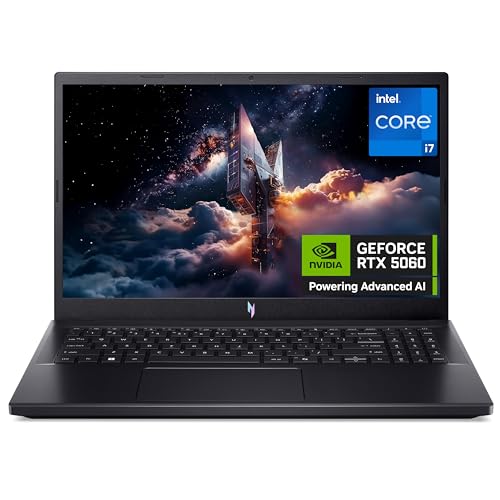


Retailer links can earn GVT commission at no extra cost to you. The purchase is with the retailer. Price, delivery, returns, seller and warranty must be checked there.
Questions worth answering before checkout
Does more VRAM make the RTX 3060 the winner?
No. Capacity is not an overall performance ranking. Relevant workload evidence and the complete configuration are required.
Can this comparison tell me the best PC at every budget?
No. Current exact configurations and prices matter. Use it to ask better questions about a shortlist, rather than as a universal score table.
How this assessment was made
GVT compares the published specifications and requirements linked beside each section, then explains the buying implications. Those implications are editorial judgement; specifications are not a substitute for game benchmarks. Catalogue stock and price checks update separately from the dated article research. No test score or automatic winner is invented.
Retailer options can change without changing the research date. How GVT researches · How affiliate links support the site.
Make the next comparison useful.
Find a route for my games and budgetBuy for the games you want to play.
We’re preparing GVT buying notes: useful comparisons, setup guides and gift ideas, with reasons to choose and reasons to skip. Join the free list to hear when they’re ready.
Free to join. We use your email for these buying notes. How we use your data.